云数据库-MongoDB 白嫖攻略

在开始搭建朋友圈系统之前,我们需要一个免费的数据库来存储用户动态、图片等信息。推荐使用以下几种免费云数据库服务:

  1. MongoDB Atlas - 提供免费512MB存储
  2. 阿里云MongoDB - 提供免费的4核8G实例(部分地区)
  3. 腾讯云MongoDB - 提供免费100MB存储
  4. 华为云MongoDB - 提供免费1GB存储

数据库设计

朋友圈系统的核心数据结构包括:

1
2
3
4
5
6
7
8
9
10
11
12
13
14
15
16
17
18
19
20
21
22
23
24
25
26
27
28
29
// 用户动态集合
{
_id: ObjectId,
userId: String, // 用户ID
username: String, // 用户名
content: String, // 动态内容
images: [String], // 图片URL数组
likes: [String], // 点赞用户ID数组
comments: [ // 评论数组
{
userId: String,
username: String,
content: String,
createdAt: Date
}
],
createdAt: Date, // 发布时间
updatedAt: Date // 更新时间
}

// 用户信息集合
{
_id: ObjectId,
userId: String,
username: String,
avatar: String, // 头像URL
bio: String, // 个人简介
createdAt: Date
}

云函数-阿里云EMAS

有了数据库之后,我们就可以开始提供API了,这里我们使用阿里云EMAS提供的云函数来实现。阿里云的EMAS服务的开发者版是免费的,免费额度一般是够用的。

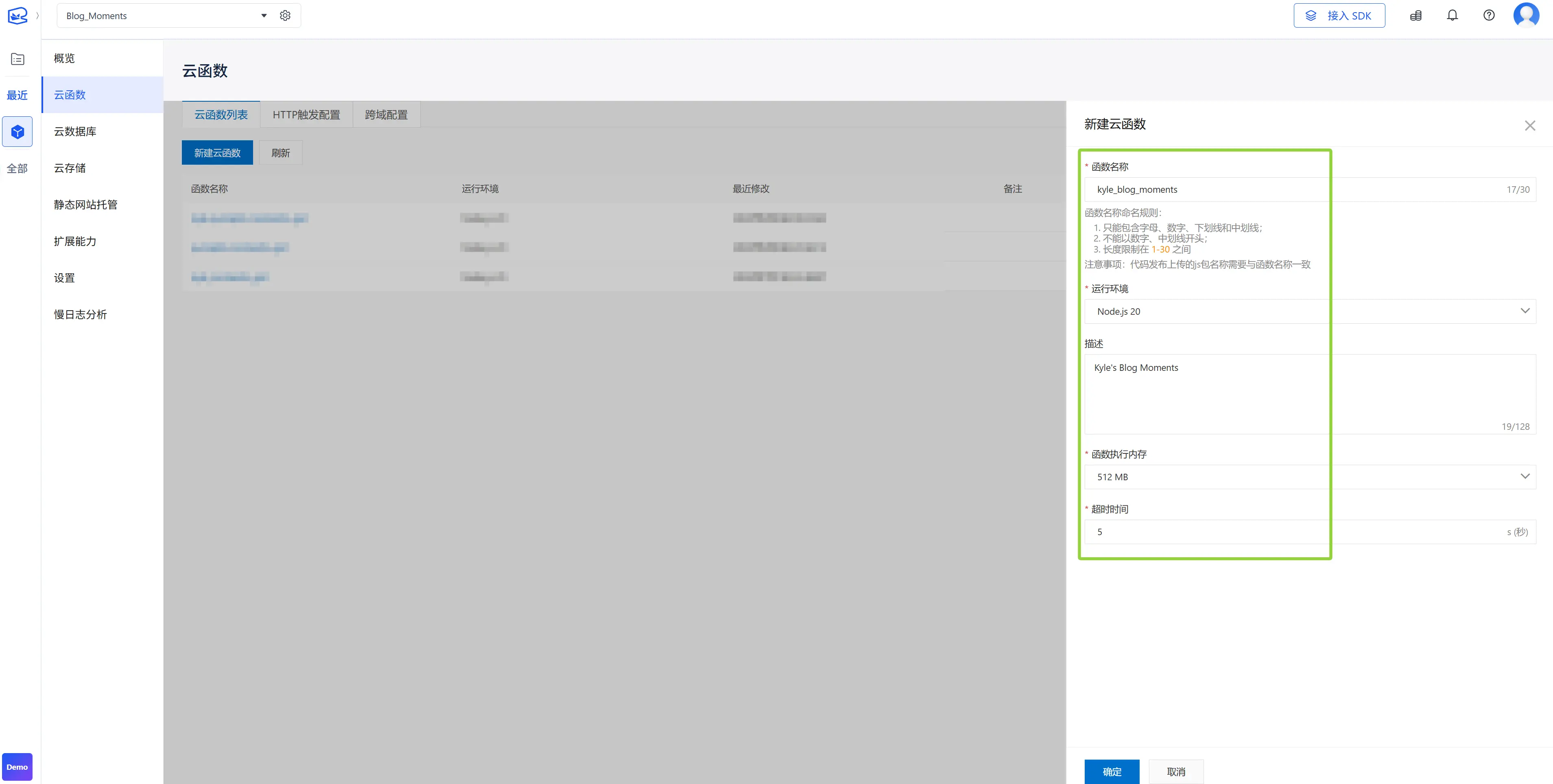
步骤一:创建云函数

  1. 登录EMAS管理控制台,选择Serverless,点击进入。
  2. 在左侧导航栏,选择云函数
  3. 单击新建云函数
  4. 输入函数名称,函数名称长度在1-30个字符间,只能包含字母,数字、下划线和中划线,不能以数字、中划线开头。

    重要:云函数名称必须要和上传的Node.js代码包名称一致。

  5. 选择运行环境。
  6. 选择运行环境。运行时支持列表
  7. 选择函数执行内存,目前支持128M,256M,512M,1024M,2048M。
  8. 输入描述。

步骤二:定义完整的API云函数

1. 项目结构

1
2
3
4
5
└── friendCircleAPI
├── index.js # 主入口文件
├── package.json # 依赖配置
└── utils/
└── database.js # 数据库连接工具

2. 数据库连接工具 (utils/database.js)

1
2
3
4
5
6
7
8
9
10
11
12
13
14
15
16
// MongoDB连接配置
const connectDB = async (ctx) => {
// 从环境变量获取MongoDB连接信息
const connectionString = ctx.env.MONGODB_URI || 'your-mongodb-connection-string';

try {
// 使用EMAS内置的MongoDB驱动
const db = ctx.mpserverless.db;
return db;
} catch (error) {
console.error('Database connection error:', error);
throw error;
}
};

module.exports = { connectDB };

3. 主要API接口 (index.js)

1
2
3
4
5
6
7
8
9
10
11
12
13
14
15
16
17
18
19
20
21
22
23
24
25
26
27
28
29
30
31
32
33
34
35
36
37
38
39
40
41
42
43
44
45
46
47
48
49
50
51
52
53
54
55
56
57
58
59
60
61
62
63
64
65
66
67
68
69
70
71
72
73
74
75
76
77
78
79
80
81
82
83
84
85
86
87
88
89
90
91
92
93
94
95
96
97
98
99
100
101
102
103
104
105
106
107
108
109
110
111
112
113
114
115
116
117
118
119
120
121
122
123
124
125
126
127
128
129
130
131
132
133
134
135
136
137
138
139
140
141
142
143
144
145
146
147
148
149
150
151
152
153
154
155
156
157
158
159
160
161
162
163
164
165
166
167
168
169
170
171
172
173
174
175
176
177
178
179
180
181
182
183
184
185
186
187
188
189
190
191
192
193
194
195
196
197
198
199
200
201
202
203
204
const { connectDB } = require('./utils/database');

module.exports = async (ctx) => {
const db = await connectDB(ctx);
const { method, action } = ctx.args;

try {
switch (method) {
case 'GET':
return await handleGet(ctx, db, action);
case 'POST':
return await handlePost(ctx, db, action);
case 'PUT':
return await handlePut(ctx, db, action);
case 'DELETE':
return await handleDelete(ctx, db, action);
default:
return { error: 'Unsupported method', code: 405 };
}
} catch (error) {
console.error('API Error:', error);
return { error: error.message, code: 500 };
}
};

// 获取朋友圈动态
async function handleGet(ctx, db, action) {
switch (action) {
case 'getPosts':
const { page = 1, limit = 10 } = ctx.args;
const skip = (page - 1) * limit;

const posts = await db.collection('posts')
.find({})
.sort({ createdAt: -1 })
.skip(skip)
.limit(parseInt(limit))
.toArray();

return {
success: true,
data: posts,
pagination: { page: parseInt(page), limit: parseInt(limit) }
};

case 'getPostById':
const { postId } = ctx.args;
const post = await db.collection('posts').findOne({ _id: postId });

if (!post) {
return { error: 'Post not found', code: 404 };
}

return { success: true, data: post };

case 'getUserPosts':
const { userId, page: userPage = 1, limit: userLimit = 10 } = ctx.args;
const userSkip = (userPage - 1) * userLimit;

const userPosts = await db.collection('posts')
.find({ userId })
.sort({ createdAt: -1 })
.skip(userSkip)
.limit(parseInt(userLimit))
.toArray();

return {
success: true,
data: userPosts,
pagination: { page: parseInt(userPage), limit: parseInt(userLimit) }
};

default:
return { error: 'Invalid action', code: 400 };
}
}

// 创建新动态
async function handlePost(ctx, db, action) {
switch (action) {
case 'createPost':
const { userId, username, content, images = [] } = ctx.args;

if (!userId || !content) {
return { error: 'Missing required fields', code: 400 };
}

const newPost = {
userId,
username,
content,
images,
likes: [],
comments: [],
createdAt: new Date(),
updatedAt: new Date()
};

const result = await db.collection('posts').insertOne(newPost);

return {
success: true,
data: { ...newPost, _id: result.insertedId },
message: 'Post created successfully'
};

case 'likePost':
const { postId: likePostId, likerId, likerName } = ctx.args;

const post = await db.collection('posts').findOne({ _id: likePostId });
if (!post) {
return { error: 'Post not found', code: 404 };
}

// 检查是否已经点赞
const alreadyLiked = post.likes.includes(likerId);

if (alreadyLiked) {
// 取消点赞
await db.collection('posts').updateOne(
{ _id: likePostId },
{ $pull: { likes: likerId }, $set: { updatedAt: new Date() } }
);
return { success: true, message: 'Like removed' };
} else {
// 添加点赞
await db.collection('posts').updateOne(
{ _id: likePostId },
{ $push: { likes: likerId }, $set: { updatedAt: new Date() } }
);
return { success: true, message: 'Post liked' };
}

case 'addComment':
const { postId: commentPostId, commenterId, commenterName, commentContent } = ctx.args;

const comment = {
userId: commenterId,
username: commenterName,
content: commentContent,
createdAt: new Date()
};

await db.collection('posts').updateOne(
{ _id: commentPostId },
{
$push: { comments: comment },
$set: { updatedAt: new Date() }
}
);

return { success: true, data: comment, message: 'Comment added' };

default:
return { error: 'Invalid action', code: 400 };
}
}

// 更新动态
async function handlePut(ctx, db, action) {
switch (action) {
case 'updatePost':
const { postId: updatePostId, content: updateContent, images: updateImages } = ctx.args;

const updateData = {
content: updateContent,
images: updateImages,
updatedAt: new Date()
};

const updateResult = await db.collection('posts').updateOne(
{ _id: updatePostId },
{ $set: updateData }
);

if (updateResult.matchedCount === 0) {
return { error: 'Post not found', code: 404 };
}

return { success: true, message: 'Post updated successfully' };

default:
return { error: 'Invalid action', code: 400 };
}
}

// 删除动态
async function handleDelete(ctx, db, action) {
switch (action) {
case 'deletePost':
const { postId: deletePostId } = ctx.args;

const deleteResult = await db.collection('posts').deleteOne({ _id: deletePostId });

if (deleteResult.deletedCount === 0) {
return { error: 'Post not found', code: 404 };
}

return { success: true, message: 'Post deleted successfully' };

default:
return { error: 'Invalid action', code: 400 };
}
}

4. package.json 配置

1
2
3
4
5
6
7
8
9
10
11
12
{
"name": "friendcircle-api",
"version": "1.0.0",
"description": "朋友圈API云函数",
"main": "index.js",
"dependencies": {
"mongodb": "^4.13.0"
},
"engines": {
"node": ">=14.0.0"
}
}

步骤三:部署云函数

  1. 打包代码

    1
    2
    # 在项目根目录执行
    zip -r friendCircleAPI.zip friendCircleAPI/
  2. 上传代码包

    • 在EMAS控制台选择刚才创建的云函数
    • 点击”上传代码包”,选择刚才打包的ZIP文件
    • 等待上传和部署完成
  3. 配置环境变量

    • 在云函数配置页面,添加环境变量
    • MONGODB_URI: 你的MongoDB连接字符串
    • NODE_ENV: production
  4. 设置触发器

    • 配置HTTP触发器,设置访问路径
    • 例如:/api/friendcircle

步骤四:API使用示例

1. 创建新动态

1
2
3
4
5
6
7
8
9
10
curl -X POST "https://your-domain.com/api/friendcircle" \
-H "Content-Type: application/json" \
-d '{
"method": "POST",
"action": "createPost",
"userId": "user123",
"username": "张三",
"content": "今天天气真不错!",
"images": ["https://example.com/image1.jpg"]
}'

2. 获取朋友圈动态列表

1
2
3
4
5
6
7
8
curl -X POST "https://your-domain.com/api/friendcircle" \
-H "Content-Type: application/json" \
-d '{
"method": "GET",
"action": "getPosts",
"page": 1,
"limit": 10
}'

3. 点赞动态

1
2
3
4
5
6
7
8
9
curl -X POST "https://your-domain.com/api/friendcircle" \
-H "Content-Type: application/json" \
-d '{
"method": "POST",
"action": "likePost",
"postId": "post123",
"likerId": "user456",
"likerName": "李四"
}'

4. 添加评论

1
2
3
4
5
6
7
8
9
10
curl -X POST "https://your-domain.com/api/friendcircle" \
-H "Content-Type: application/json" \
-d '{
"method": "POST",
"action": "addComment",
"postId": "post123",
"commenterId": "user456",
"commenterName": "李四",
"commentContent": "确实很不错!"
}'

步骤五:前端集成示例

1. 获取动态列表的JavaScript代码

1
2
3
4
5
6
7
8
9
10
11
12
13
14
15
16
17
18
19
20
21
22
23
24
25
26
27
28
29
30
31
32
33
34
35
36
37
38
39
40
41
42
43
44
45
46
47
48
49
50
51
52
53
54
55
56
57
58
59
60
61
62
63
64
65
66
67
68
69
70
71
72
73
74
75
76
77
78
79
80
81
82
83
84
85
86
87
88
89
90
class FriendCircleAPI {
constructor(baseUrl) {
this.baseUrl = baseUrl;
}

async getPosts(page = 1, limit = 10) {
try {
const response = await fetch(this.baseUrl, {
method: 'POST',
headers: {
'Content-Type': 'application/json',
},
body: JSON.stringify({
method: 'GET',
action: 'getPosts',
page,
limit
})
});

const result = await response.json();
return result;
} catch (error) {
console.error('获取动态失败:', error);
throw error;
}
}

async createPost(userId, username, content, images = []) {
try {
const response = await fetch(this.baseUrl, {
method: 'POST',
headers: {
'Content-Type': 'application/json',
},
body: JSON.stringify({
method: 'POST',
action: 'createPost',
userId,
username,
content,
images
})
});

const result = await response.json();
return result;
} catch (error) {
console.error('发布动态失败:', error);
throw error;
}
}

async likePost(postId, likerId, likerName) {
try {
const response = await fetch(this.baseUrl, {
method: 'POST',
headers: {
'Content-Type': 'application/json',
},
body: JSON.stringify({
method: 'POST',
action: 'likePost',
postId,
likerId,
likerName
})
});

const result = await response.json();
return result;
} catch (error) {
console.error('点赞失败:', error);
throw error;
}
}
}

// 使用示例
const api = new FriendCircleAPI('https://your-domain.com/api/friendcircle');

// 获取动态
api.getPosts(1, 10).then(data => {
console.log('动态列表:', data);
});

// 发布动态
api.createPost('user123', '张三', '今天心情很好!').then(data => {
console.log('发布成功:', data);
});

2. 简单的HTML界面

1
2
3
4
5
6
7
8
9
10
11
12
13
14
15
16
17
18
19
20
21
22
23
24
25
26
27
28
29
30
31
32
33
34
35
36
37
38
39
40
41
42
43
44
45
46
47
48
49
50
51
52
53
54
55
56
57
58
59
60
61
62
63
64
65
66
67
68
69
70
71
72
73
74
75
76
77
78
79
80
81
82
83
84
85
86
87
88
89
90
91
92
93
94
95
96
97
98
99
100
101
102
103
104
105
106
107
108
109
110
111
112
113
114
115
116
117
118
119
120
121
122
123
124
125
126
127
128
129
130
131
132
133
134
135
136
137
138
139
140
141
142
143
144
145
146
147
148
149
150
151
152
153
154
155
156
<!DOCTYPE html>
<html lang="zh-CN">
<head>
<meta charset="UTF-8">
<meta name="viewport" content="width=device-width, initial-scale=1.0">
<title>朋友圈</title>
<style>
.post {
border: 1px solid #ddd;
margin: 10px;
padding: 15px;
border-radius: 8px;
}
.post-header {
font-weight: bold;
margin-bottom: 10px;
}
.post-content {
margin-bottom: 10px;
}
.post-actions {
display: flex;
gap: 10px;
}
.post-images {
display: flex;
gap: 5px;
margin: 10px 0;
}
.post-image {
max-width: 200px;
max-height: 200px;
object-fit: cover;
}
.comment {
background: #f5f5f5;
padding: 8px;
margin: 5px 0;
border-radius: 4px;
}
</style>
</head>
<body>
<div id="app">
<h1>朋友圈</h1>

<!-- 发布动态表单 -->
<div>
<textarea id="content" placeholder="分享新鲜事..." rows="3" style="width: 100%;"></textarea>
<button onclick="publishPost()">发布</button>
</div>

<!-- 动态列表 -->
<div id="posts-container"></div>
</div>

<script>
const api = new FriendCircleAPI('https://your-domain.com/api/friendcircle');
let currentUserId = 'user123'; // 当前用户ID
let currentUsername = '当前用户'; // 当前用户名

// 加载动态列表
async function loadPosts() {
try {
const result = await api.getPosts(1, 20);
const postsContainer = document.getElementById('posts-container');

if (result.success && result.data) {
postsContainer.innerHTML = result.data.map(post => `
<div class="post">
<div class="post-header">
${post.username} · ${new Date(post.createdAt).toLocaleString()}
</div>
<div class="post-content">${post.content}</div>

${post.images && post.images.length > 0 ? `
<div class="post-images">
${post.images.map(img => `<img src="${img}" class="post-image">`).join('')}
</div>
` : ''}

<div class="post-actions">
<button onclick="likePost('${post._id}')">
👍 ${post.likes ? post.likes.length : 0}
</button>
<button onclick="showCommentForm('${post._id}')">评论</button>
</div>

${post.comments && post.comments.length > 0 ? `
<div class="comments">
${post.comments.map(comment => `
<div class="comment">
<strong>${comment.username}:</strong> ${comment.content}
<small>(${new Date(comment.createdAt).toLocaleString()})</small>
</div>
`).join('')}
</div>
` : ''}
</div>
`).join('');
}
} catch (error) {
console.error('加载动态失败:', error);
}
}

// 发布动态
async function publishPost() {
const content = document.getElementById('content').value.trim();
if (!content) {
alert('请输入内容');
return;
}

try {
const result = await api.createPost(currentUserId, currentUsername, content);
if (result.success) {
document.getElementById('content').value = '';
loadPosts(); // 重新加载动态
alert('发布成功!');
}
} catch (error) {
alert('发布失败,请重试');
}
}

// 点赞
async function likePost(postId) {
try {
const result = await api.likePost(postId, currentUserId, currentUsername);
if (result.success) {
loadPosts(); // 重新加载动态
}
} catch (error) {
alert('操作失败,请重试');
}
}

// 显示评论表单(简化版)
function showCommentForm(postId) {
const comment = prompt('请输入评论:');
if (comment) {
api.addComment(postId, currentUserId, currentUsername, comment)
.then(() => loadPosts())
.catch(() => alert('评论失败'));
}
}

// 页面加载时获取动态
loadPosts();

// 每30秒自动刷新
setInterval(loadPosts, 30000);
</script>
</body>
</html>

步骤六:优化和安全考虑

1. 性能优化

  • 分页加载:实现动态的分页加载,避免一次性加载过多数据
  • 缓存策略:在前端实现简单的缓存机制
  • 图片优化:使用CDN存储图片,实现图片压缩

2. 安全性考虑

  • 输入验证:对所有用户输入进行验证和清理
  • 权限控制:实现用户认证和权限验证
  • 防刷机制:限制API调用频率
  • XSS防护:对用户输入内容进行HTML转义

3. 错误处理

1
2
3
4
5
6
7
8
9
10
11
12
13
14
15
16
17
18
19
20
21
// 在前端添加错误处理
async function safeAPICall(apiCall) {
try {
return await apiCall();
} catch (error) {
if (error.response) {
// 服务器返回错误
console.error('API Error:', error.response.data);
alert(`操作失败: ${error.response.data.error || '未知错误'}`);
} else if (error.request) {
// 网络错误
console.error('Network Error:', error.request);
alert('网络连接失败,请检查网络设置');
} else {
// 其他错误
console.error('Error:', error.message);
alert('操作失败,请重试');
}
throw error;
}
}

总结

通过以上步骤,你已经成功搭建了一个完整的朋友圈发布系统:

免费的基础设施:使用免费的MongoDB和阿里云EMAS
完整的API功能:发布、查看、点赞、评论等核心功能
简单易用的前端:提供了完整的前端集成示例
良好的扩展性:代码结构清晰,易于扩展新功能

这个系统可以作为个人项目、学习demo或者小型社交应用的基础。你可以根据需要添加更多功能,如:

  • 用户认证系统
  • 图片上传功能
  • 消息推送
  • 好友关系管理
  • 动态搜索等

希望这篇文章对你有所帮助!如果有任何问题,欢迎在评论区讨论。